Showing posts with label Blogging. Show all posts

How To Expand Widget Templates in New HTML Editor

Image representing Blogger as depicted in Crun...


After the launching of New HTML Editor , Every One is Confused What To Do? How To Use New HTML Editor ? It's Quite Simple and easy,but One Question which mostly I saw in Comments was How To Expand Widget Templates in New HTML Editor? It's Not a big Deal But Let me clear it first What is Expand Widget Template? Actually "Expand Widget Templates" was an option in Old HTML Editor.By Default Old HTML Editor only shows the core code and hides the widgets Code,By Enabling this Option You Can easily Edit any Blogger Template.All Template Core Code along-with Widgets Code will be shown when you check "Expand Widget templates" Option.

Where Is Expand Widget Templates

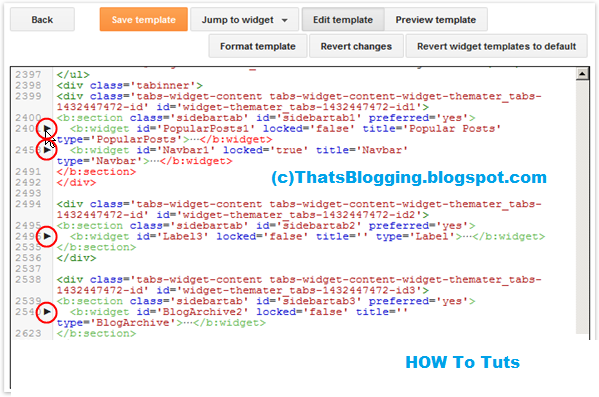
There is no Option for Expanding Widget Templates in New HTML Editor.Because All the Codes have been shown in the New Editor,that's why You Don't Need to Expand that Code any more.In New HTML Editor all widgets have been folded,A Widget Code Section which has been folded is identified by a bold fold marker i.e arrow symbol ?,near next to the line Number.Whenever You Click on this Arrow symbol ,the concealed widget code section is revealed.
New-Html-Editor

How To Expand Widget In New HTML Editor

As we mentioned above there is no option to expand the templates in New HTML Editor however the Code has been folded and we can easily reveal that code just by Clicking the arrow mentioned above.

How To Search For A Specific Section

It is very Simple to search for a line , tag or any word in new HTML editor.First of all Click between the Code/Script of Template>>Now Press CTRL+F >> A Box will pop-up at Top right side>> Enter the desire text , tag or any character you want to search in the template Coding.Moreover if the Tag is in folded Code,by searching it will automatically reveal from concealed widget.

Directly Go To Widget Code

You Can Directly jump to a widget Code in New HTML Editor.All You have to do is use Jump To Widget feature to easily and quickly locate the desired location/Code.After finding the widget Click on ? to expand the widget before editing.
So What's Up: Still Confuse in Using New HTML editor? Ask Any Question Freely,we are here to help you in any Problem,Stay Blessed,Happy Blogging!

Enhanced by Zemanta

Stop Your Image Stealing Using Jquery


Consider, you are working hard in creating images for your webpage and someone just copy and paste on their webpage without any credit or appreciation, then how would you like to feel? In today's post, here is a important trick for every blogger or webmaster to stop your Image stealing. You just have to put a little piece of code in your template which will prevent users to copy Images from your web page.
Stop Your Image Stealing Using Jquery

How To Stop Your Image Stealing ?

  • Go to Your Blogger Dashboard > Template > Edit HTML.
  • Take a backup of your template.
  • Now find for <head> in your template
  • Add below code just above/before <head>
<script src='http://ajax.googleapis.com/ajax/libs/jquery/1.7.1/jquery.min.js' type='text/javascript'/>

Note - If your blog have already a jquery plugin then ignore this step.

  • Now again find </head>
  • And add below code just above/before </head>
<script type='text/javascript'>
//<![CDATA[
$(function(){
$(".post-body img").after("<img src="https://blogger.googleusercontent.com/img/b/R29vZ2xl/AVvXsEgC38RCkIRxVopkiSZXkWcLQiHgN21G3VPuvWVDGkk2i4DvZ4GJTAt4LUI8LPmPYhUUhCHZmziQZXuSP6SCElLCYm4N3jGXAPW6zrAcQOBagBjKVY_BehE_ONR5jiEjOVXbU4g0pzCaRRXV/s1600/Stealing-Detected.png" alt="Blogging State Stealing Detected" style="margin-left: -212px; opacity: 0; position: relative; top: 0;" />");
});
//]]>
</script>

I hope this small trick will surely help you to prevent your Images from republishing on other websites.

Enhanced by Zemanta

How To Add Border To Blog Header Using CSS


 Add Border To Blog Header Using CSS:
Assalamualaikum Friends , after a long time i am back in Blogging , actually i was busy in 2nd Grade studies and now it's going to end !! Hope you all are fine , here is a small trick via which you can add border to your blog header with the help of CSS.Actually it's not a big or smart trick but some people are waiting desperately for this trick! If you are One of them here we go ! You will think how it will looks like? So , take a look on the below snapshot which has 24px cyan color border.And for live demo , take a look on our Blog header.

How To Add Border To Blog Header Using CSS

  • Go To Blogger Dashboard
  • Click On Template
  • EDIT HTML
  • Search For "header" and find out "#header-wrapper {" this CSS Code
  • Now below { and above } type border: style pixels color-name  as shown in the below snapshot
  •  Now Save the template and that's it :)
  • You Can Change the Style to dashed , dotted , groove or any style and pixels to your desired no and color to your desire choice!
So What's Up : Actually developers will laugh , but i know many People like this trick and they don't know what to Do and How To Do? But i am here for you guys , if you have any problem you can ask freely , i will help you in any problem . Stay Blessed , Happy Blogging!

Create Some Fake Computer Viruses

Step 1 Studying

Today I am sharing another interesting article about "How To Make Fake Funny  Computer Virus". In this tutorial I teach you how to make a harmless and fake virus, Basically what it does is just log off and then "Shutdown" your computer.
Disclaimer - Everything here is for informational purposes only.

1. Fake error message

Step-1 Make a new text document with notepad, type msg * YOUR MESSAGE, image refer below:

Type your fake massage

Step- 2 Now save as Play me.bat As always, make sure that you select All files instead of Text Document.


Here's how it will look like once it is launched:

Fake error message

2. Forced Shutdown

Step-1 Put the following into your Notpad:

@echo off
shutdown -s -f -t 60 -c "YOUR MESSAGE HERE"

(Replace 60 with the length of the countdown you want)

Step- 2 Now save as play me.bat

Here's how it will look like:
Fake forced shutdown
To stop it, open Run from the start menu and type shutdown-a. Enjoy
Enhanced by Zemanta

How To Create Table Of Contents in Blogger


Create Table Of Contents in Blogger : 

By Creating Table of Contents in your Blog will help you to arrange your Blog Contents category wise.This Widget is specially designed for blogs which contains alot of categories , this widget will enable them to place all the categories along-with the specific posts in a page called "Table of Contents".The most interesting fact about this widget is that it will help the readers to inform that which post is "New" and which is "Old" . The word New will dance with latest posts and Old will be with Old Posts.

How To Create Table Of Contents in Blogger

  • Get into Blogger Dashboard
  • Click On Pages
  • Create a Static Page
  • Click On HTML of the Page
  • Copy the below script and paste it into the Page HTML
 <script src="//sites.google.com/site/blogger9dotnet/color-css/blogger9.js"></script>
<script src="/feeds/posts/summary?alt=json-in-script&amp;max-results=1000&amp;callback=loadtoc" type="text/javascript"></script>
  • Name the Page "Table Of Contents" or any thing else
  • Hit Publish and that's it!
So What's Up : This widget just arrange all the Blog Contents in a social way.And it helps the readers to navigate old and new posts.Stay Blessed ,Happy Blogging! 

How To Link Google AdSense And Google Analytics Accounts


It is necessary for you to incorporate Search engines AdSense Consideration with your Search engines Statistics.The Reward Factor is that you can quickly monitor the ad performance(i.e CPM,CTR,etc) of every web page of your Weblog without developing AdSense Programs.You Can See all details About your Blog/Website at Search engines Statistics.

How To Link Google AdSense And Google Analytics Accounts

  • Go To Your Google Analytics Account and Login there(if you don't have any account create it)
  • Once You enter into Google Analytics Dashboard >> Click On Admin Tab as shown

  • Now There Click On The Site(URL) which You want to link with AdSense Account.
  • Another Window will Pops-up >> Click On User Tab
  • Now Click On New User Tab


  • Now After these Steps add your AdSense E-mail Address which you want to Link with Google Analytics >> Give Administrator Permission to the entered e-mail.
  • Now Logout from Google Analytics Account and Sign in to AdSense Account >> Click On Account Settings Tab
  • Now Go To Access and Authorization Tab >> There Click Google analytic integration tab and Edit(Accounts Link).


  • Now for linking Account Just Click On Link and for Unlinking Click Unlink Option !


  • That's it ! Happy Blogging!

So What's Up : By Linking Google AdSense and Google Analytics Accounts You will get some extra information's about Your AdSense Earning and improvement or dropping in Earning.However for the best analysis I recommend "Linking Of Adsense Account with Google Analytics".


How To Add Comment Counter to Post Header Titles in Blogger


Add Comment Counter to Post Header Titles in Blogger:

By Default numbers of Comments is shown below the each post in Comment Section.As it is placed below post , so most of us never noticed it.Now If you are interested in adding this Comment Counter to Header it will really inspire your blog readers and will socially force them to comment.It's a fact , if you add Comment Counter near to Blog post Title it will be totally better then the below area.And it will surely inspire your Blog Readers to Comment on your Posts.What Do You Think this Counter is better neat to Post Titles? If Yes, Then follow the following steps.

How To Add Comment Counter to Post Header Titles in Blogger

How To Add Comment Counter to Post Header Titles in Blogger

  • Go To Blogger
  • Click On Template
  • EDIT HTML
  • Search for ]]></b:skin>
  • Now Copy the Below Script and add it just above ]]></b:skin>

.comment-count {
float : right;
width : 47px;
height : 47px;
background : url(  SPECIFIC IMAGE URL  );
background-repeat: no-repeat;
font-size : 19px;
position:absolute;
margin-top : -16px;
margin-right : 2px;
text-align : center;
}
  • Now Chose the Comment Counter Background


  • Now Copy the Image URL and Replace SPECIFIC IMAGE URL in the script with the image URL
  • Now Add Comment Count Code 
  • For That Again Go To Blogger Dashboard >> Template >> Edit HTML >> Search For
    <h2 class='post-title entry-title' itemprop='name'> OR class='post-title entry-title'
     
  • Now Copy the Below Script and add it below the Above mentioned Code
<b:if cond='data:post.allowComments'>
<a class='comment-count' expr:href='data:post.addCommentUrl' expr:onclick='data:post.addCommentOnclick'><data:post.numComments/></a>
</b:if> 
  • Now Save Template and That's it !
 So What's Up : If You Liked this tut , Please Share it and Express your views in Comments . Stay Blessed ,Happy Blogging!

Show Post Titles Only On HomePage in Blogger


 This Tutorial will enables you to Display Posts Titles in a dwelling sheet along-with Comments Bubble on your Blog Home Page.These Titles are link with the original posts , the time One Click On Any title it brings him/her into the Specific Post.Moreover it makes your Blog Easy to navigate, so your Blog readers can easily navigate any post.Now How To Implement this Hack in Blogger, follow the below easy steps.

 How To Show Post Titles Only On HomePage in Blogger

  • Go To Blogger Dashboard
    • Click On Template
    • Then Click On Edit HTML
    • Search For </head> Tag
    • Now Copy the Below Script and paste it Before </head> tag
    <style type='text/css'>
    
    <b:if cond='data:blog.pageType != "static_page"'>
    <b:if cond='data:blog.pageType != "item"'>
    
    .post {
    margin:.5em 0 1.5em;
    border-bottom:0px dotted $bordercolor;
    padding-bottom:1.0em;
    height:50px;
    }
    .post h3 {
    margin:.25em 0 0;
    padding:0 0 4px;
    font-size:20px;
    font-family:Tahoma,Georgia,Century gothic,Arial,sans-serif;
    font-weight:normal;
    line-height:1.4em;
    color:#cc6600;
    }
    
    .post h3 a, .post h3 a:visited, .post h3 strong {
    display:block;
    text-decoration:none;
    color:#cc6600;
    font-weight:normal;
    }
    
    .post h3 strong, .post h3 a:hover {color:#333333;}
    
    .post-body {display:none;}
    .post-footer {display:none;}
    .comment-link {display:none;}
    .post img {display:none;}
    .post blockquote {display:none;}
    .post blockquote p {display:none;}
    h2.date-header {display:none;}
    .post-labels {display:none;}
    .post-rating {display:none;}
    
    </b:if>
    </b:if>
    
    </style>
    • Now Just Hit Save Template
  • Now Go To Layout >>  Page Elements >> Click Edit >> Enter The "Number Of Posts On Main Page".
  • Hit Save and that's it!

Top 3 Link building strategies 2013


Link building is just a way of leaving traces all over the internet through which your web blog can be reached by anonymous person. Its like you leave your address all over the globe and people reach to you through that address. It can be one of the major source of traffic to your blog if done in a right way. There are various link building ways you can follow to attract some readers. Some of them are been discussed below. 


  • Commenting on other blogs. You are most probably already familiar with this technique. its still the basic and best technique for creating a link to your blog on some higher page rank blog. If you have not taken care of this, you should start spending some quality time on this. You can read this article to create better links while commenting.
Leaving comments on another blog.


Blogs hosted on bloggers do not have inbuilt link generating features. However, you can still post links in the comment section of the blogger.

  • Yahoo answers. Yahoo answers can be very useful in driving traffic to your blog. Answer questions related to your niche in yahoo. Choose at least 10 questions each day and answer them in such a manner so as the user is tempted to visit your blog while reading the answer. In starting, you won't see significant rise in traffic, but just imagine posting 10 links a day for a month will create 300 links to your blog. And yahoo answers are already search optimized. People will reach to it through search engines also. And getting some 'Thank you's are really motivational. Isn't it. 

  • Posting in Forums. Many forums provide the facility of putting links in your signature. Utilize this feature. Answers questions in forums mentioning links to your blogs and you will start seeing some of the traffic from them. There are numerous forums related to your niche. You just have to select 3-4 of them with high rankings, answers questions already asked putting links in your answers. Choose those topics which are crowded and a progressive discussion is going on. There is no point in posting links to a topic which has been dead for a year. 
I am working on second part of this article. If you have any other ways of link building, do post in comments. I will surely take up your advice. 

Top 5 Ways of Driving Traffic from LinkedIn.


Creating a blog, either as a hobby or with the intention of making money, the top priority has always been to reach out to maximum people. And linkedIn is often missed out in driving traffic to your blog.
Driving traffic to your blog through LinkedIn/

The main reason why LinkedIn is not used effectively by other bloggers is the fact that Its not so social like Facebook, primarily considered as a job-seeking resume uploading website, and due to its somewhat difficult to use interface. 

However, if used consistently, LinkedIn can boost your traffic to a great extent and the major benefit of traffic from LinkedIn is that you get highly targeted visitors - Quality traffic.

Here is 5 ways of getting traffic from LinkedIn: 


¦Update your profile. Complete your profile 100%, add your own profile picture, and fill out all the details seriously. The more you look genuine, the more you attract people towards your shares and posts. If your profile is partially completed and weak, people may never read visit your profile or follow you or add you in their connection.
    One more benefit of completing linkedIn profile is that your linkedIn profile is directly shown in search engines. Anybody going for a search of your name will likely to find you in search results.
      Keeping a genuine account also improves chances of engagement with other people on linkedIn. Extending your reach is always beneficial. 

        ¦Increase Your Connections. Add more and more people in your connections. Invite them from your e-mail contact lists, other social networking platforms like Facebook, Google+, Twitter etc. You can even add people whom you interact on linkedIn or who are of same interests/ niche to you. The more 1st level connection, the more your reach. Its good to build a connection pool of genuine people who communicate and engage with you. 


          ¦Join groups. Search for groups of your niche and join them. linkedIn groups are highly targeted and sharing articles with them will increase your visitors. Don't be frustrated not getting approved from some groups. LinkedIn groups are strict in their policies, and the moderators may not approve you in 1st place. Search for similar 'open groups' and you will still find the targeted audience. 
            ¦Create your own group. Its not a good idea for a new LinkedIn signed up user, but if you have spent some time on LinkedIn, and managed to have a good reach, create your own community. Put links of your blog in the group description. Anyone joining your group will go to read the group profile 1st, and that may convert into traffic to your blog. 

              ¦Engage with people. Join in the discussions in comments section, groups and walls. The more you communicate with people, the more you increase your reach. Moreover, if you consistently participate in group discussions, people will notice you more, and next time you post an article links in that group, you surely gonna get more visitors than earlier. 


              So, If you have been missing your traffic share from LinkedIn, its not too late. Join, follow these points and earn some quality traffic. All the best. !! 

              If you have any other point regarding generating traffic from LinkedIn, do mention it comment. I will update it in this post :) 

              Common reasons for AdSense ban


              AdSense is undoubtedly the best paying network for publishers. But this comes at the cost of strict policies that Google maintains to ensure that it remains best. Getting into AdSense is the toughest job for a beginner blogger and even after getting approved, there are high chances of getting banned if some common practices are not kept in mind. Here is the list which you should keep in mind to ensure that you and your relationship with AdSense remains safe through out your blogging career.
              AdSense Google earning

              • Encouraging clicks. You, as a publisher are not allowed to encourage your visitors to click on your ads in any way. You cannot make it look as a part of your blog's content. It must look like its an ad to the visitors.

              • Misleading labels. You cannot label to your ads as 'click here', 'our sponsors', recommended websites/blogs', or put it in an way that your visitors find it difficult to differentiate it as an ad. You cannot even put labels as support us, click here and let us eat, etc etc. 

              • Design of your site. You cannot design your site in accordance to your ads as if they misguide the visitors. Putting an arrow sign pointing to the ads is one such example which will lead to your AdSense ban.
              • Ads on Redirected pages. You cannot put ads on those pages which are been redirected when a user do an activity on your blog, like commenting. Ads on thank you page, or exit page are not allowed in terms of AdSense. Make sure that you haven't done any such mistake. You cannot even put ads on websites which keep on refreshing after an allowed time. You may have noticed that many sites which have this thing of refreshing after some seconds keeps the refresh action to a certain frame and not to ads. E.g. A site maintaining scores in cricket will only refresh the scores and not the complete page which includes AdSense ads.
              • Ads in chats, or instant messaging services are not allowed. It should only be on website/blog where your content is served. You cannot put ads in e-mail or any software application.

              • Buying clicks. You cannot buy or sell clicks. You cannot ask people to click on your ads and tell them that you will pay a part of your income to them. Its illegal in the eyes of AdSense. 

              • Ads aligned with images. You cannot place ads in alignment with images. It may look like a part of the image sequence and it is not allowed. You must in any case put the ads in such a way that the user is able to distinguish it from contents. 

              • Google Do not allow placing of ads on sites that have more than 3 pop ups. They also restrict placing ads in a pop, which may keep floating in the rightmost corner of site, or which re-emerge after every 30seconds or so. 

              Although, these are the most basic terms and condition of AdSense, many publishers are banned due to going against these policies. As a publisher, if Google bans you for once, you are banned for your life time and 9 out of 10 cases do not get their account back. You should be really lucky in getting it back and the chances are very thin. So, why to take risk. Prevention is always better than cure. Although there are several AdSense alternatives but non of them are as efficient as it. If you use AdSense you will surely agree with my point. So keeping all these points will lead to a better relationship between you and the AdSense. Its up to now. 

              Noticing invalid clicks in my Account. What to do?


              In last few days, I personally noticed a lots of clicks with 0 CTR, only from U.S. The click through rate for my ads on one of my website doubled and I got a hint of some kind of attack from some jealous people around the world. I always though Blogger is much safer than WordPress in these kind of fraudulent activities but that's not true, at least in these past 15 days. So, what should I do to save my Adsense account? What should I do to stop these invalid clicks? 

              I personally talked with several webmasters in blogging world, some experiencing the same problem, some even got banned due to these, and some are trying to save themselves just like me. And frankly I didn't get a satisfying answer. All were having different opinions but still some point was in common. 

              Google says its your responsibility to save yourself from these invalid clicks. So they won't even think before banning you. If your account is an year old, still you are not at all safe. One of my friends got banned with a good reputation with adsense and that's ridiculous. Just because someone sitting in a room thousands of miles away, open your blog and clicks your ads several times must not lead to 'your' account ban. But still Google works that way.

              Question is what should we do if we detect these unusual activities? 
              • Remove AdSense. The first and most effective way is remove AdSense ads from your affected blog as soon as possible for some days. And then re-establish these ads and hope that the fraudulent activity will dis-continue. If its not, dis-continue again. 
              • Trace the ip address of the clicks. Most probably, all the invalid clicks will be from the same location and ip address. You can use Google analytics to trace that. I noticed 1 page view from an ip address and number of clicks. Clearly, its a matter of invalid clicks. So i reported the ip address to Google and even banned it.  
              Even by following these clicks, if you have been banned, then perhaps you should look beyond Google.  Time for a switch. There are not as good as Adsense but still better alternatives. Try them. Learn them. And earn from them. Your banning means you have been penalized for something you have not done so its not your fault. Its theirs that they lost one of there trusty customer. Join with other publishing programs, direct advertisement selling, buysellads, affiliate marketing. You may get more than Adsense. 

              Top 5 Ways To Monetize Your Blog.


              There are various ways to earn money from your blog. Many webmasters start blogging for the sole purpose of making money but majority of them give up because they don't see any practical earnings in the beginning. However, money making from blog takes some time and the results are shown to those who continue even after seeing a little or no income at all in beginning. The real thing is to keep hanging up for some time, may be an year. 
               
              Here is a list of 5 different ways of making money to your blog. Choosing the right option for yourself depends upon your niche and the way of your blogging and you should give a research as to which form will earn you more. Or you can try some for days, and find out the best one for yourself. 


              1. Pay Per Click. This is the most widely used form of earning. As the name suggest, you get paid when a visitor clicks on the ads shown on your website. This method of earning is beneficial with websites/blogs receiving a lot of traffic, since only a small number of visitors will gonna click on your ads. The CTR (click through rate) is the number of clicks per hundred visitors. A normal optimized for ads website tend to receive about 3-4 % of CTR on an average. So earning from this method really needs a good amount of traffic. 
              Some of the most widely used PPC programme are 

                   ¦Google AdSense
                   ¦Chitika
                   ¦Clicksor


              2. CPM Advertising. CPM is Cost per Mile. Instead of earning from the clicks you get on the ads, you get paid by the number of times the ads are shown to the visitors. Put it simple, the more pageviews you get, the more you earn, irrespective of any clicks. CPM advertisement is a sure shot mode of earning.

              The rates are fixed per 1000 page views. That means if you get 10,000 visitors (page views) and the ad network is paying you a CPM of 1$, then you will make 10$. As you can see, for earning a small amount you need a lot of visitors. CPM advertising is best suitable for blogs with very high traffic. Getting a few hundred visitors will earn you penny for a day. The plus point is that you are sure of those pennies irrespective of clicks. 

              There are various CPM advertising networks like

                   ¦Casale Media 
                   ¦Clicksor
                   ¦BurstMedia 
                   ¦Tribal Fusion
                   ¦Value Click media. 

              Some of these have minimum requirements. You can have a look on them by visiting their websites. 

              3.  In-Text Ads. In-Texts-ads are contextual advertisements where keywords from your posts are selected and an advertisement is connected to it. The keywords are double underlined or dotted, and when a visitors hovers mouse on those keywords, the advertisement is pop up-ed. Here the payment is usually through cost per mile. The benefit of In-text advertising is that they don't take any space on your blog and normally do not lower your site speed. 

              The two most widely used In-Text Ads schemes are

                   ¦Infolinks
                   ¦Kontera 


              4. Affiliate Marketing. With this kind of advertisement, you earn commission from each sale that is done through your referral link. You write reviews about products and when some one buys any product through your referral, they pay you a commission. 

                   Lets say a network pays you a commission of 5%. If someone buys a thing with cost price Rs 100,000, you will make Rs 5000. That's a lot of amount to earn from CPC and CPM ads.

              Affiliate marketing is favourite among some of the blogger since chances of earning much more is higher. However, setting up a fan base, reviewing products, and compelling people to buy a product is a hectic task. 
              Some of the affiliate Marketing networks are 

                   ¦ClickBank
                   ¦AffiliateWindow
                   ¦Commission Junction
                   ¦Amazon


              5. Selling ads spaces on your blog. Selling ad spaces on your blog to display advertising banners is a good way of monetizing blogs. This is a profitable thing, since all the money comes to you and no middle person/ company takes a part of your income. The interested advertisers contacts you, a deal is done and you are paid for banners you display on your blog. These can be CPC banners or CPM banners depending upon the advertisers choice. 

              You can still go to third party for managing of Selling-buying ads so that you don't have to deal with the complexities. However, then the third party will eat up a part of your income. 

              The major advantage is that you have the option of deciding the minimum rates for the ads you will show on your blog. 


              Do you use any other method to monetize your blog? Feel free to share it to the readers of this blog. Time to make some money. 


              How to change Blogger's default Template.


              Blogger's worst thing you may have noticed is its years-old templates. The dashboard has been revised but the templates remains same. However, with time, there has been hundreds of third party templates designed and released for free to blogger.com users. These third party templates needs to be manually uploaded to blogger.com. Here is a quick tutorial to change your bloggers default template.
               

              ¦ Go to Blogger Dashboard > Template

              ¦Select Backup / Restore option from the right hand side upper corner of the template dashboard.

              ¦ Download full template before uploading any third party template. You don't want anything wrong with your already developed blog, so keeping a backup is always a necessary thing. 

              Blogger Template Backup / restore
              ¦ Now, browse through your PC and select the template you wanna upload. The template will be uploaded. 


              How to customize your already applied Template: 

              ¦ Go to Blogger Dashboard > Template. Select Customize. 

              ¦ Blogger Template Designer is open. Now you can adjust Widths, size, Background Images, Templates Fonts and many more. 


              If you know HTML and javascripts, you can manually modify your site's design by going to 
              Blogger Dashboard > Templates > Edit HTML. 

              Important: Don't forget to keep a backup of your template before making any change. Always preview your template if you edit its HTML source, if its loading correctly, you are in right direction, else, you need to revert changes. 

              How to increase AdSense cost per click (CPC)


              Cost per Click is the amount an advertiser is willing to pay for the clicks that are generated on the ads shown on your page. AdSense has a bidding process in which different advertisers bid for the ad space on your blog and the highest bidder gets a chance to display their ad. AdSense on its own ensures that the most paying ad is shown on your page so that you earn maximum. Its not in your control to decide to decide the ads or to fix the amount for charging. However, by following some of the basic practices, you can increase you Cost Per Click for the ads and earn maximum from the adsense. 

              Practices to increase AdSense Cost Per Click.
              • Enable all of your ad units to show both text and images rich ads. When you limit a unit to show only a particular kind of ad, either text or image ads, you are limiting the number of bidders and thus lowering your chances of earning maximum. Lets get it with an example. Suppose you have limited a ad unit to show only text ads. And you receive a CPC of 1$ on it. What you miss out is that there may be an Image ad that is willing to pay more than 1$ per click. By increasing the number of advertisers to compete for the ad unit, you are increasing your chances of getting higher bid than you get normally. So, its always better to enable all ad units to show both images/media ads and text ads.
              • The first ad unit that appears in your blog's html receives the ads with maximum CPC. Suppose you have put three ads units, one as a leader board, a sidebar, and one at the bottom of your posts. Now, naturally you will wish that the highest paying ads are shown on leader board, since there are more chances of people clicking on them, so you have to put the leader board AdSense ads first in your html code. You may achieve this by trying and testing. 
              • Keep your filter list small. Filtering majority of ads for whatever reason will ultimately lead to less advertisers competing for your blog, and hence less earning.
              • Developed countries CPC are usually higher than under-developing countries. You will get a higher CPC from US than from India. So, building a country specific audience will limit your reach. Its also not at all advisable to target only US audience. You are paid for Indian clicks too. Whatever it is. The point is, don't limit your audience to a particular country and try to build a follower list of countries like US, UK, etc. 
              The ultimate goal is to allow maximum number of advertisers bid for the ad space on your blog. The more competition, the more earning. By enabling both rich media ads and text ads does this only. 
              However, in doing all these practices you must avoid some points. 
              • Don't believe that writing for high paying keywords will earn you more CPC. This is a good practice unless you over do it. You are writing for people who reads you. Don't over do it. Moreover, Google says that it don't encourage any such practice.
              • Don't use multiple accounts. Its a violation of terms for Google and your account will be suspended as soon as they discover it. 
              • Don't change the behavior of AdSense Ads in any way. Its not permitted under Google terms and conditions. 
              Most of the publishers learns from experience. Keeping these points will certainly help you in increasing CPC for AdSense ads.
              If you have any point in your mind, mention in comments. It will be a privileges for me and my readers. 

              Unmatched Ad Request in Google AdSense.


              If you are an AdSense publisher and monitoring your account regularly, you must have noticed "unmatched Ad Request". You can view it under Performance report > Bid type. 

              What is Unmatched Ad Request basically? 
              When a user visits your site or blog with AdSense Ad units, these Ad units sends a request to AdSense to display a relevant ad to the visitor. If there are no ads returned for this request, it is counted as unmatched Ad request. The ad units are then shown as blank spaces. 


              The problem is not that you are getting Unmatched Ad Requests. The real trouble is that some publisher will have more of these requests than others. The chances of earning from these ad requests are NIL since there are no ads served and there is no clicks or impressions pay. 

              Reasons for higher unmatched ad requests. 
              • Using link units on site. If you are using link units on a blog/site, there will be higher unmatched ad requests. This is due to the fact that a matched ad request for a link unit is counted only if a visitors click on them. Since there are hardly any clicks on link units these days, these all are counted in unmatched ad requests. 
              • Poor content. Chances are that your content is not receiving enough bidders due to poor quality contents. No one want to show ads on a web blog with low or bad quality contents. So, may be you are not getting enough ads as per ad requests. Some ad requests don't have ads to display. 
              •  Blocked list. If you block half of the advertisers, how could you fulfill all the ad requests your blog generates. So be careful about that. 
              • Unusual ad size. Square or rectangle and more frequently used ad sizes have more bidders and hence lower unmatched requests. Don't go for any unusual ad sizes. 

              Although you know now what may be the reason for unmatched ad requests, you can hardly take any steps to shield yourself. Almost everyone keeps their filter list small. If you are approved by AdSense, there is almost negligible chances of poor quality content. And since Google is the leader in publishing-advertising market, number of bidders in most cases will never run out for an ad space. 

              How to utilize unmatched ad requests to your benefits.?
              This is where back up ads come into the picture. While creating ad unit, Google asks for back up ads in case there is no ads to display. Link one such another ads from any other publishing network you are using. This is the most you can do with unmatched ad requests. 

              At last, you don't need to really worry about unmatched ad requests unless you are earning from AdSense. There is no any such negative aspects of it, and there is hardly anything you can control. You can at most write quality contents to attract maximum bidders, use more obvious ad sizes, keep your filter list small. 

              Technorati for driving traffic to your blog


              Technorati is a blog search engine indexing more than a million blogs till date. Its a place where different blogger share their blogs and can be used as a great marketing tool for your blog. Technorati provide a 'authority system' which measures site's influence in the blogosphere and ranking in its niche. The authority is measured on 0-1000 scale and 1000 is the best. 

              Technorati ranking system. Technorati also provide a ranking system where your blog is ranked according to their algorithm. I will not get to it as you can find that information on their website. Based on the ranking system, top 100 lists are calculated and placed on the home page. Being in top 100 list can get you a huge consistence traffic although its quite difficult to get in it. However, even in top 1000 list will bring to you a considerable amount of traffic. 


              How to register. 

              • Sign up for Technorati.com . 
              • You will be asked to verify whether you are the author of the blog which you registered. They will generate a token which you have to include in any post. You can either create a new post or update an existing one putting that token it its text. 
              • Once they will crawl your website and find that text, you will be registered and they will final review your blog. Due to a huge number of blog being registered daily, it will take time since final review is a manual process. May be a day or two.
              • Once you are approved, your blog will be listed in their blogosphere. 

              Some key points regarding Technorati marketing.
              • Choose specific category for your blog. Creating a blog on 'body building' and choosing a category 'technology' will always lead to poor ranking. 
              • Check your technorati status and ranking often, to see your progress and compare your results with your previous ones. 
              • Try hard to get to top 100 or even top 500 list. It will bring to you a huge lot of traffic. I was in top 2500 and getting 5% of my traffic from them. 
              • Since, technorati is a place of bloggers, people visiting your blog are quality traffic. They are interested in your blog, so they are visiting you. 
              • Technorati is just one more place to have backlinks. Interact with other bloggers, visit their blogs, discuss with them. 
              Any more questions? You can put that in comments. Visit a day later, and you will find it answered. Surely. !!